
What makes a load combination governing?
A load combination governs a particular check when it produces the most adverse value of that check’s criterion. For a reinforced-concrete section, the governing ULS efficiency case can differ from the governing crack-width or service-stress case.
A row with the largest bending moment is a useful candidate, but it is not automatically the governing combined section check. Axial force, the second bending moment, reinforcement asymmetry and the direction of bending all matter. The N–My–Mz resistance domain is a better mental model than three independent maximum-force lists.
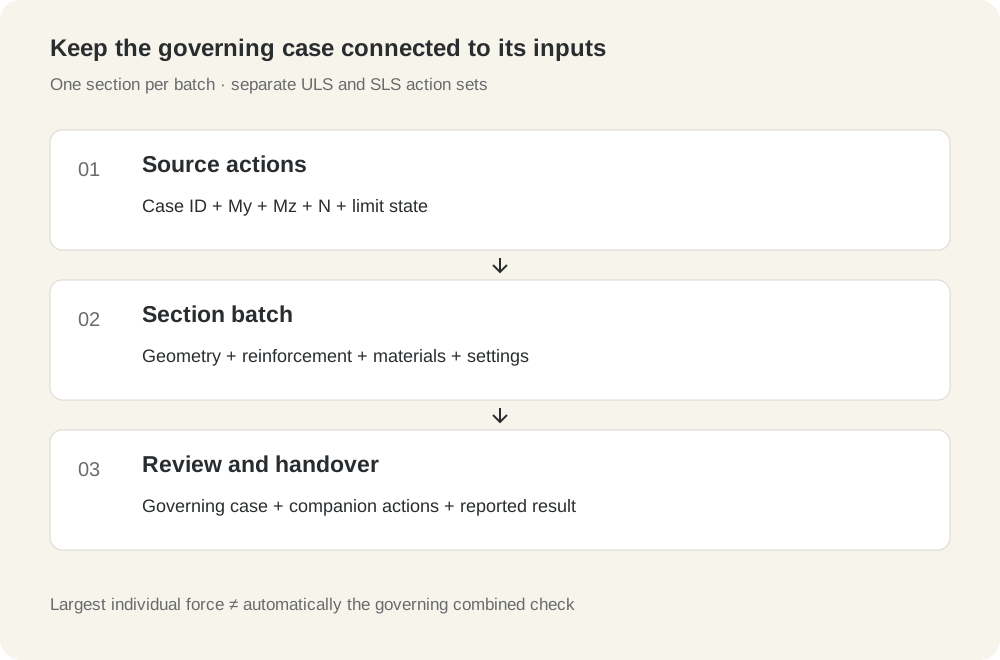
For SLS, specify what you are ranking: crack width, reinforcement stress or another project criterion. A smaller moment with axial tension may be more adverse for crack control than a larger moment accompanied by compression. Calculate and inspect the relevant cases rather than deciding from the moment column alone.
Preserve N, My and Mz from the same combination
Each row must retain its companion actions: the axial force and both bending moments belonging to the same combination, location and analysis step. The following miniature source table illustrates the difference between that and independently enveloped columns:
| Case ID | My (kN·m) | Mz (kN·m) | N (kN) |
|---|---|---|---|
| A | 180 | 10 | −500 |
| B | 130 | 55 | −100 |
| C | 95 | 35 | +150 |
Here, N is declared tension-positive for the illustration. These values are invented to explain data handling; no resistance or crack-width ranking has been calculated for them. Without a section and a consistent model, we cannot state which row governs.
Taking the largest My from A, the largest Mz from B and the largest tensile N from C creates the artificial triplet (180, 55, +150). It did not occur in the source table. A deliberately conservative envelope can be appropriate in a defined method, but it must be recognised and documented as an envelope—not labelled as one of the analysed combinations.
The same problem occurs when independent maxima are taken from different positions along a member or different dynamic steps. Preserve the source location and step in the case map before exporting a numeric import table.
Prepare a load table that survives review
Keep a master table with identifiers and a numeric table in the format expected by the section checker. COSA’s batch action columns are ordered My, Mz, N. Match that order explicitly instead of relying on the export’s original headings.
| Check | Why it matters |
|---|---|
| Separate ULS and SLS | Use the correct factored or serviceability action set and identify the required SLS combination category. |
| Declare units | Distinguish N from kN and N·mm from kN·m before import. |
| Map axes and signs | Check the section orientation, moment directions and axial-force convention with a known case. |
| Check reference points | Resultants referred to a different origin need the appropriate force–moment transformation. |
| Validate every numeric cell | Find empty values, text, non-finite numbers and decimal-format errors; do not silently replace missing actions with zero. |
| Preserve a case map | Link each imported row to its source combination, section, location and step. |
| Review duplicates | Repeated action triplets may be valid; preserve every associated source ID if consolidating them. |
Any required second-order effects and other member-level action adjustments must already be represented in the design moments being checked. A section batch does not generate those effects or create the project’s code-compliant combinations.
If the same numeric table is to be used for different sections, confirm that its actions belong at each section location. Copying one member’s demand table across a project is not automatically a valid design workflow.
Download a 10,000-row practice table
The files below give you a repeatable way to practise import, row mapping and review. They contain synthetic action triplets, not combinations generated from a structural model or from Eurocode load-combination rules. They provide no section resistance, crack-width results or measured processing times.
- 10,000-row numeric practice table: My, Mz, N.
- Companion case map with stable IDs P00001–P10000.
- Dataset scope, units and import instructions.
The numeric CSV has a header. Paste the 10,000 data rows into the action table; keep the header and case-map fields out of numeric cells. The map’s data-row index starts at 1 after the header. Preserve it if you sort or filter the data.
My and Mz are in kN·m; N is in kN and declared tension-positive in the source file. Establish the section axes and convert conventions as needed. Treat the file as a ULS workflow exercise; it is not an SLS action set and must not be used as project design data.
Run the concrete section batch in COSA
COSA performs a batch of load combinations for one section at a time. A multi-section project or Word report does not mean that a single load batch automatically checks every section in the project.
- Define and verify the section. Use a parametric section or DXF geometry, position the reinforcement and confirm material and calculation settings.
- Run a known single case first. Inspect the signs, tension face and expected behaviour before importing a large table.
- Choose the check. Use ULS for section-efficiency analysis or SLS for the relevant service results. Prepare a separate action set for each.
- Paste the action rows. Use My, Mz, N in that order, and reconcile the imported row count with the source file.
- Run the batch and inspect its output. Resolve failed or incomplete rows before treating the maximum displayed result as the governing case.
- Return to the source case. Match the result’s action triplet or row reference to the case map and retain its original ID.
- Repeat for another section when needed. Use its corresponding actions and retain a distinct section-to-case mapping.
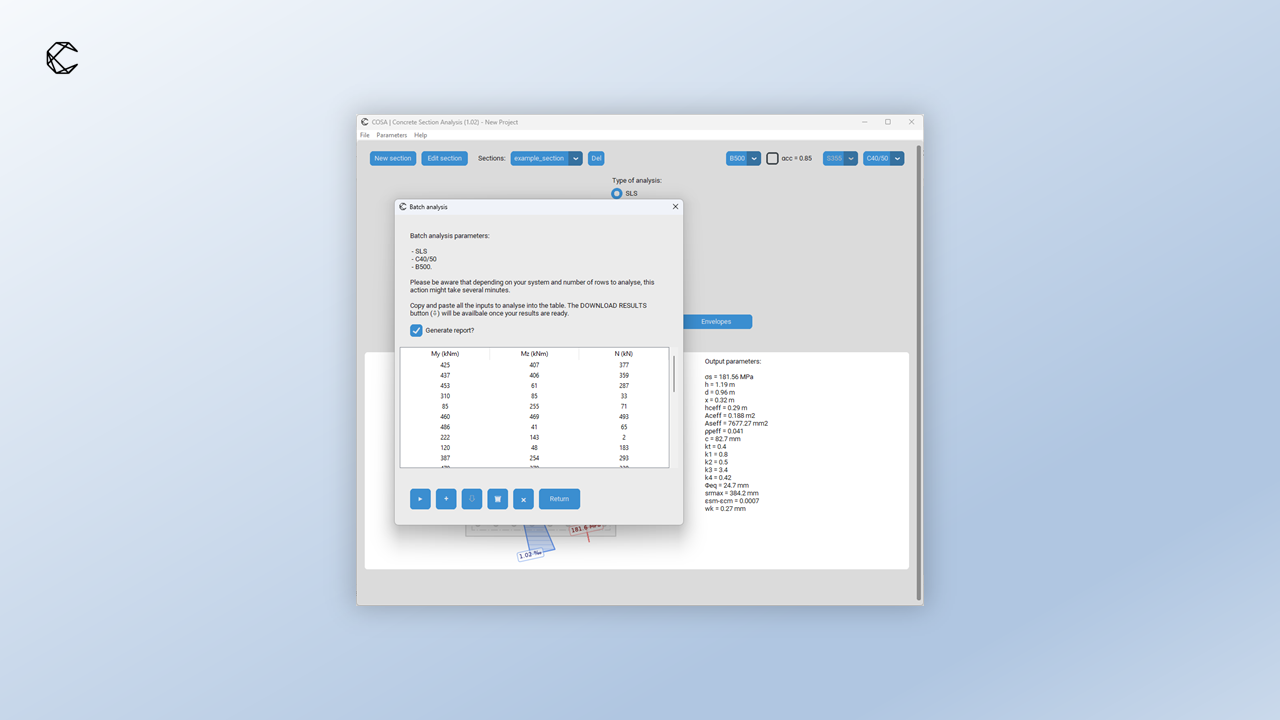
Processing time depends on the section, calculation type, settings and computer. ULS and SLS are different calculations; a timing for one is not evidence of the other’s runtime. When benchmarking your own workflow, record those inputs together with row count and any failed rows.
Review more than the single largest result
Start by confirming that the expected rows produced usable results. A skipped, non-converged or incomplete case remains unresolved; it cannot be discarded because the successful rows look acceptable.
Rank ULS cases by the reported section-efficiency criterion and SLS cases by the relevant service criterion. Retain the governing row for each. Then inspect nearby candidates—particularly rows with a different axial-force level or bending direction—to understand why the ranking changes.
Use a result-to-source review table such as this one:
| Record | What to retain |
|---|---|
| Section and check | Section ID, geometry/reinforcement revision, ULS or SLS criterion |
| Source | Original case ID, combination category, location and analysis step |
| Actions | My, Mz and N from the same row, with units and conventions |
| Result | Calculated value, relevant limit and the resulting utilisation or comparison |
| Status | Successful calculation or a clearly identified unresolved case |
| Recheck | Single-case confirmation for governing or unexpected results |
A rerun of the governing row as a single calculation is useful for inspecting details. It checks that the batch row and the individual run are set up consistently; it is not an independent validation of the underlying calculation method.
Do not reduce a section-resistance conclusion to a whole-member approval. Stability, shear, torsion, detailing and other required checks remain part of the overall design. For crack control, the worked EC2 crack-width example explains the intermediate quantities behind one SLS result.
Turn the batch into a traceable calculation package
A useful report allows a reviewer to reproduce the governing check without searching through thousands of unexplained rows. Keep the section definition, reinforcement, materials, calculation assumptions, code basis and action conventions next to the selected results.
COSA’s Word reports can bring several sections into one document. Include the governing case IDs and source mapping in the calculation package, together with any unresolved rows and the decisions used to resolve them. Retain the complete source action table alongside the report so its selected rows can be traced.
If you change the reinforcement, material assumptions or section geometry, rerun the relevant complete action set. The previously governing case may no longer be the most adverse one. A report assembled before the change does not describe the revised section.
Practical questions
Can I check only the maximum moment?
That is not generally enough for combined axial force and biaxial bending. Use the actual companion actions and calculate the criterion you need.
Can the same batch serve both ULS and SLS?
Only if the actions genuinely belong to both assessments, which should not be assumed. Normally, prepare the distinct action sets required by each limit state and serviceability criterion.
Does this practice file include calculated COSA results?
No. It is an original synthetic input dataset for practising the workflow. No performance or design conclusion is attached to it.
Does a single batch check multiple sections?
COSA’s batch workflow operates on one section at a time. Multiple sections can be collected in a project and a report.
References and related workflows
- EN 1990: project-adopted limit-state and action-combination requirements, with the applicable National Annex.
- EN 1992-1-1: project-adopted section-resistance and serviceability requirements. The crack-width example explicitly uses the 2004 formulation.
- Autodesk Structural Bridge Design: Eurocode section-analysis and interaction-surface examples, for related section-analysis concepts.
- fr.aime labs: ULS section envelopes and companion N–My–Mz actions.
- COSA parametric sections, envelopes, batch analysis and multi-section reports.