
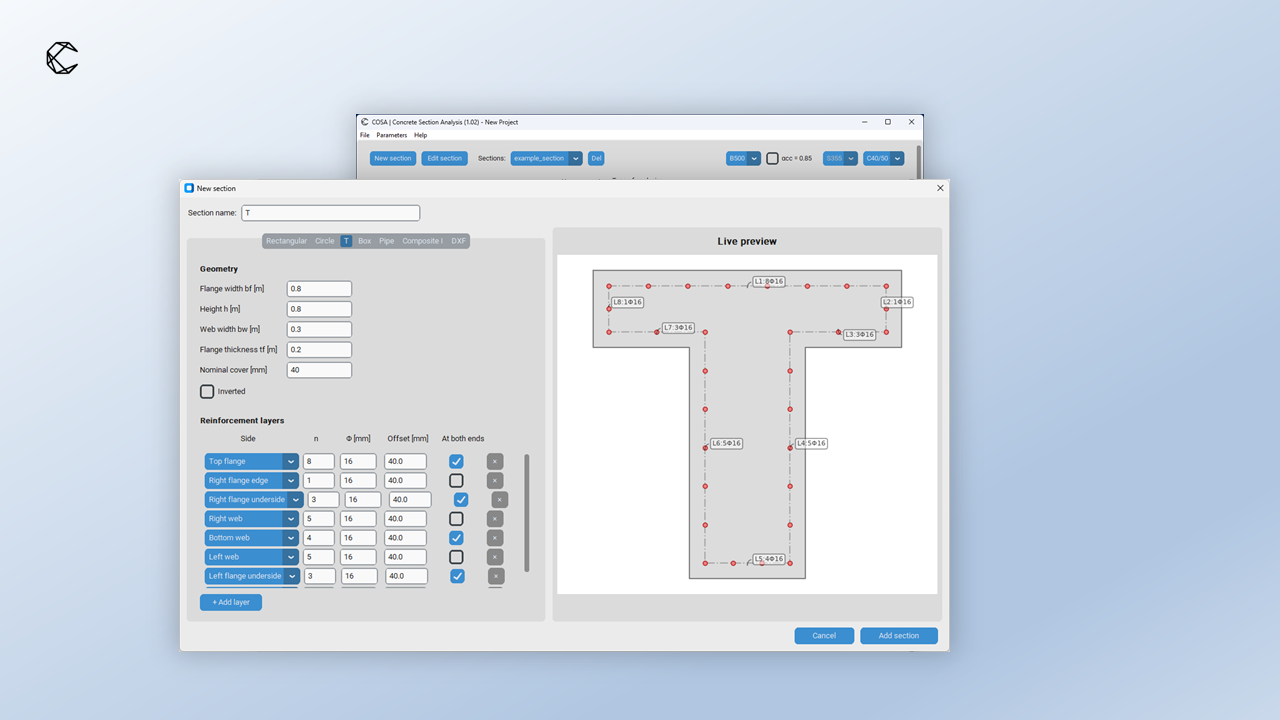
Parametric sections without rebuilding the geometry
Define rectangular, box, circular, pipe and inverted-T sections through their dimensions and reinforcement layouts. Change the section parameters directly, then run the check with the revised geometry.
For geometry outside the parametric options, COSA also supports arbitrary sections imported from DXF, including openings. The same section-analysis workflow covers axial force and biaxial bending at ULS, together with SLS checks.
Project parameters you can control
Set the material properties and safety factors required for your project. Editable project parameters support user-defined materials and adjustments to the default calculation settings, so the assumptions remain explicit.
Full interaction envelopes in 2D and 3D
Generate the section’s N–My–Mz interaction envelope and inspect it as a 3D surface or as N–My, N–Mz and My–Mz slices. Use the fixed-action controls to examine the resistance at the axial force or bending moment relevant to your design.
Export envelope data as tables for further processing. For the calculation background, read how to calculate ULS section envelopes according to Eurocode 2.
Faster batch analysis, clearer results
For ULS efficiency calculations, COSA processes 100,000 rows in less than a minute, faster than earlier releases. Processing times vary with CPU and section complexity. SLS batch calculations take longer.
Run a batch of load combinations for a section and inspect the important calculated values directly in COSA. The refreshed results view brings more of the calculation output into the application, reducing the need to move between the software and exported tables.
Multiple sections in one Word report
Export a single Word report covering multiple sections. The redesigned reports bring the section information and calculation results together in one document, making it easier to prepare a calculation package for review.
Try COSA Free
Start with COSA Free to calculate individual rectangular, circular and T sections. Use a familiar section to check your inputs and explore the core calculation workflow.
Interaction envelopes, batch analysis, arbitrary sections, editable project parameters and report exports are available with a paid licence.